
Scavenger
Categories:
Tags:
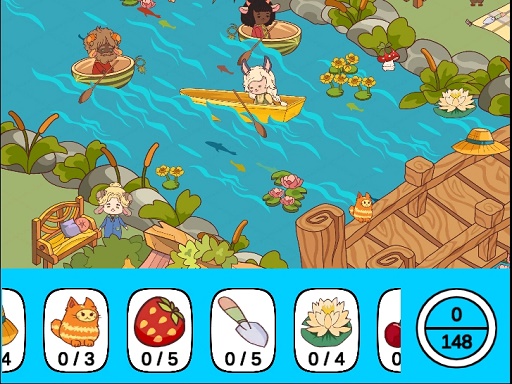
Dive into Scavenger’s bright 2D maps and hunt for hidden objects. Each item you need is shown at the bottom of the screen with a photo hint and a required quantity—collect them all before the timer runs out.
How to Play Scavenger
- Scan the scene: Hidden objects appear throughout the map, just below the play area.
- Use the photo hint: An approximate image of each object is displayed to help you spot it.
- Count and collect: Each object has a specific quantity to find—track how many you’ve picked up.
- Beat the clock: Gather every required item before time expires to win the level.
Controls
- Mouse click or tap to play.
Tips for Scavenger
- Keep your eye on the photo hints—those are your quickest clues for what to search for.
- Notice how many of a particular object you still need; it helps you prioritize where to look next.
- Scan the whole area, then zoom in on the spot where the object likely hides.
- Watch the timer closely; running out of time ends the run, so pace yourself.
FAQ
Collect every required item before the timer runs out to win the level.