
Spooky Links
Categories:
Tags:
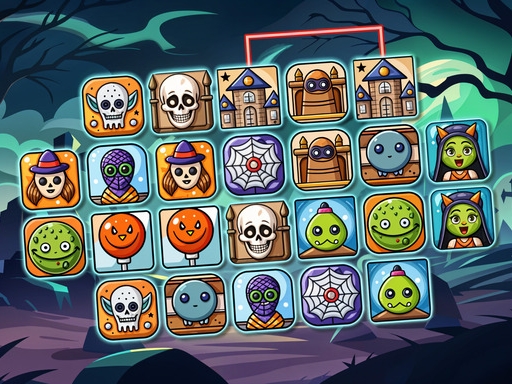
Spooky Links invites you to pair eerie tiles in a relaxed Halloween setting by connecting matching tiles with a path that turns at most twice. Each successful match clears tiles, opening space for the next pair until the board is empty.
How to Play Spooky Links
- Tap a spooky tile, then tap its matching tile.
- If the line that links the two tiles makes two turns or fewer, the tiles disappear.
- Clearing tiles creates more room, which helps you locate other matches.
- Your goal is to clear all tiles on the board to finish each level.
- Levels feature different Halloween-themed tile sets, giving a fresh layout each time you play.
Controls
- Tap or click on a spooky tile.
- Find and select its matching tile.
- If the path between them has two or fewer turns, the tiles will be cleared.
- Clear all tiles to complete the level.
- Use your mouse or touchpad to play.
Tips for Spooky Links
- Prioritize simple paths: Choose pairs whose connection requires only one or two turns to free space quickly.
- Clear corners early: Tiles in tight corners often block others; removing them first can open more opportunities.
- Watch the board layout: Keeping an eye on tile distribution helps you anticipate which pairs will become solvable soon.
- Plan moves ahead: Since each removal changes the board, think a step or two ahead to avoid getting stuck with unreachable pairs.
FAQ
If the line connecting the tiles makes two turns or fewer, the tiles disappear. This clears space on the board. The goal is to clear all tiles to finish the level.